
Every cash flow forecast is a guess – the question is how good a guess. "Roughly zero" is the boring answer. "Exactly how roughly?" is the interesting one. And it turns out you can calculate it – and show it in a beautiful visualisation – with a bit of (university) maths.
The maths comes neatly packaged in Fluidly's Forecast component. You don't need to understand the algorithm to use it – connecting your invoices is enough. But since the maths behind it is rather neat, let's take a look at how it works:
Every payment in or out falls into one of these:
- Supplier invoices (accounts payable), where the amount is known AND the timing is known, because we are the ones who press the pay button,
- Customer invoices (accounts receivable), where the amount is known but the timing is not – when the customer will actually pay,
- The exceptions: the customer paid only half, or nothing, or we only got half the delivery.
For each invoice we can then derive a small probability function: a curve describing when the payment is likely to arrive, with a tail that catches late payers. So 100 invoices become 100 probability functions – and the crux is combining them into ONE forecast…
At the bottom of every mathematician's toolbox lies a sledgehammer. Brutal and slow, with a beautiful name: Monte Carlo.
For a larger company, a Monte Carlo simulation takes 2–3 minutes to build a reasonably useful picture of how all those probability functions behave together. Change anything – a payment date, or take out an invoice – and it's another 2–3 minutes.
To our knowledge, we are the first to find an analytical solution to the problem. That means Fluidly's Forecast component delivers a faster and more accurate result than Monte Carlo, in just 20–30 milliseconds. So we can try out different payment dates for the invoices in our AP flow and immediately see the risk of running out of cash, and when that risk is greatest.
Below, we have put such a flow together (it's also a ready-made blueprint in Fluidly).
Start with the payments
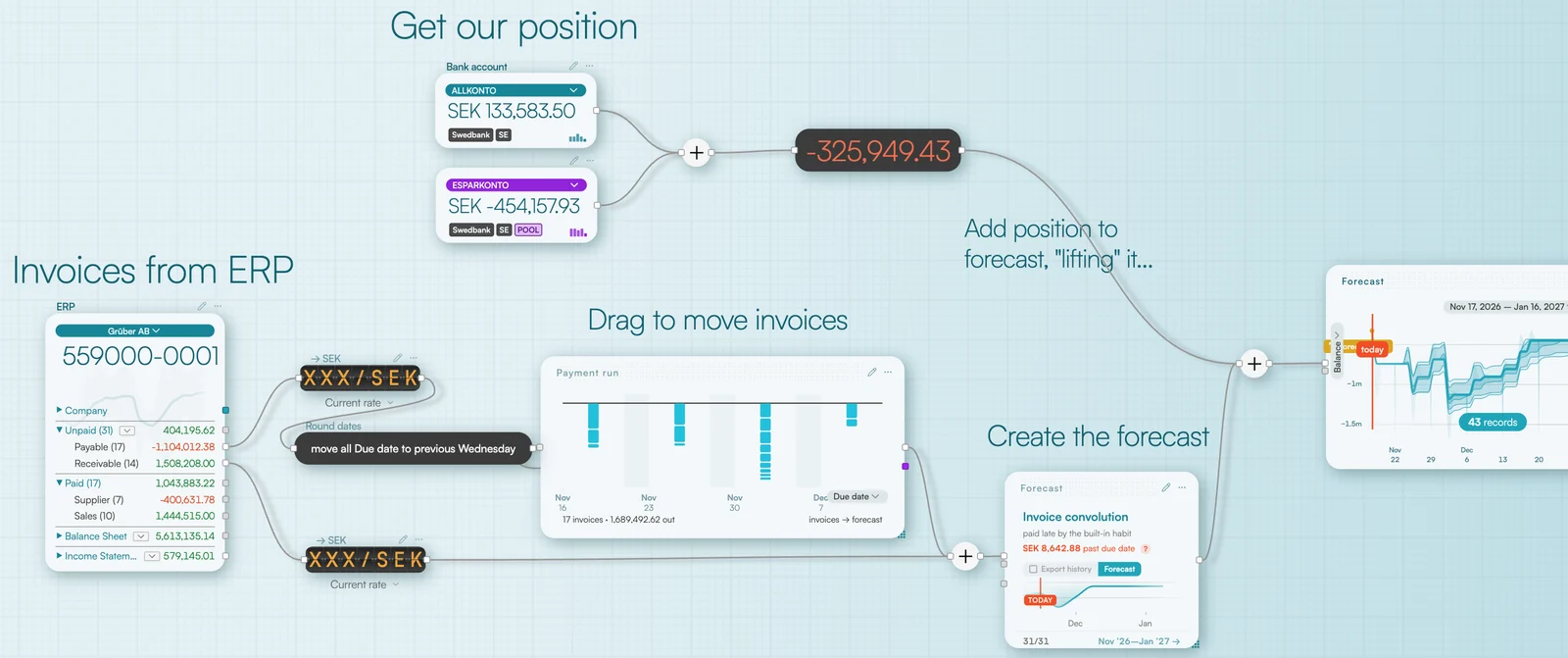
We start with the supplier invoices from the ERP. But the due date isn't always the day the money leaves the account. Many companies, for example, gather their payments on one payment day.
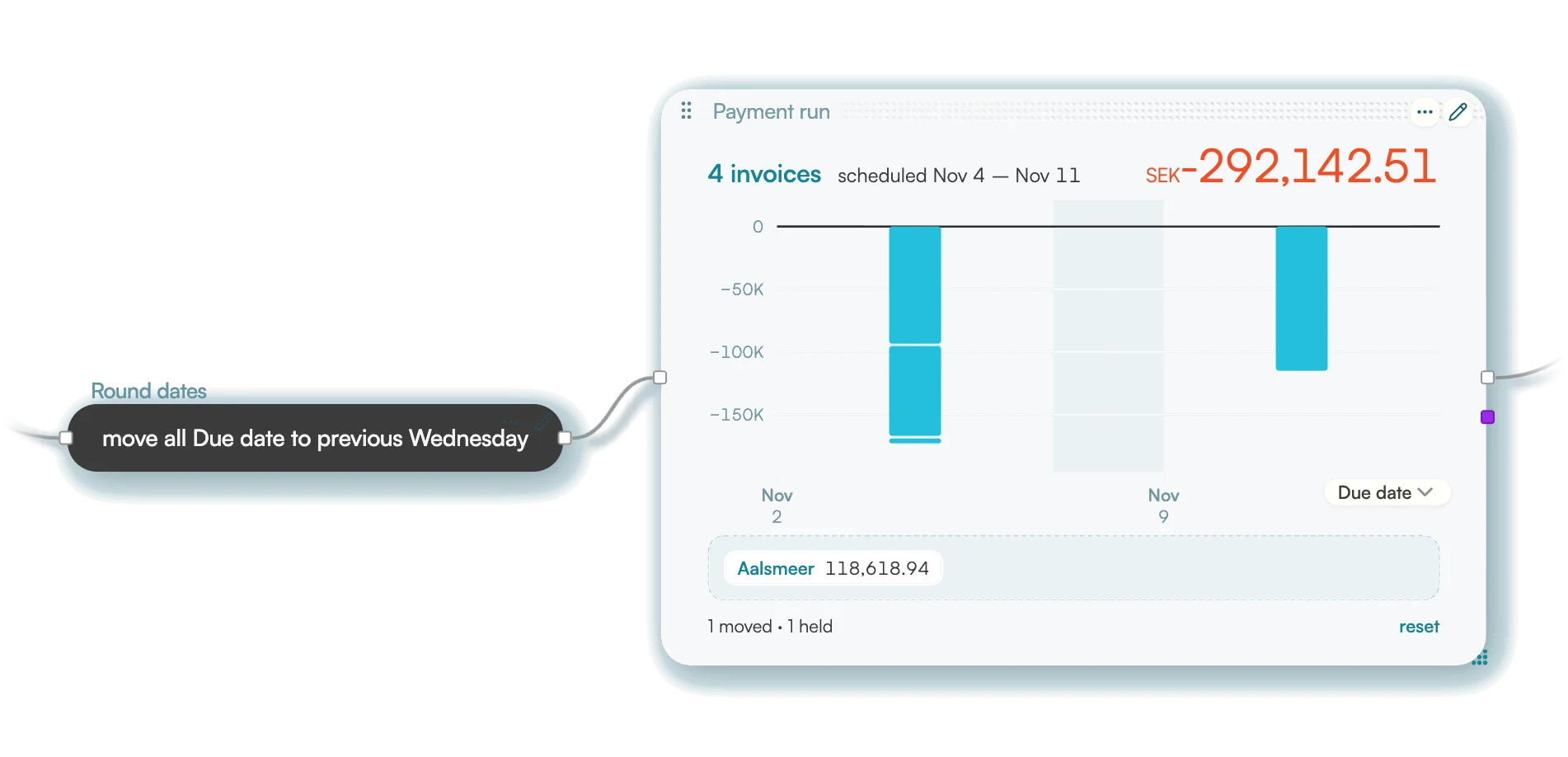
So we route the invoices through a Round component (yes, Fluidly can round not only numbers but dates).
Here we round the due date to the previous Wednesday. That way the invoice flow follows how the company actually pays.
Then comes Payment run.
It shows the invoices on a timeline. You can drag individual payments forward or back in time, or take out invoices you don't want in the payment run.
Add up money in and money out
Now we have a planned AP flow: the company's payments to suppliers.
But money doesn't only leave the account, of course. We also need the money on its way in: customer payments, the AR flow.
Adding AP and AR together gives a far more complete picture of the company's future cash flow.
Do you have invoices in foreign currencies? Then run the AP and AR flows through an FX Rates component first. The amounts are converted to the company's home currency AND the uncertainty in the exchange rate is carried into the forecast!
Make it a habit to always route invoices through a currency conversion. It costs nothing, and the flow keeps working if invoices in a foreign currency turn up later.
This is where the Forecast component comes in. It takes the flows and works out how the company's liquidity will develop over time. You don't have to choose a method yourself. Fluidly picks one automatically from the kind of data you connect, and invoices are where Forecast shines (this is where the algorithm above is used).
If you have recurring customers, you can also connect the ERP component's Paid port to Forecast – it then sharpens the forecast using how your customers have paid before.
A forecast with many possible outcomes
Here comes the really interesting part: the Forecast component passes the uncertainty on to the components after it. When we connect the forecast to a Timeline, for instance, the result is shown as a timeline with a probability distribution – a fan of possible outcomes around the expected path.
Double-click the timeline to choose the risk level to use in further calculations, and see how much money you can expect to have left in the account, even when things turn out worse than expected.
The timeline now answers questions like:
- How likely is it that we have at least 28,000 euros in the account in eight days?
- What's the risk we're short of dollars after month-end?
- How much do we need to move to another account to lower the risk of missing upcoming payments?
Now you can go back to Payment run, move a payment to another day and immediately see how the probability distribution changes. Perhaps the risk of cash dropping below a certain level goes down – or perhaps you just move the risk to another day. You can experiment until you find a payment plan that suits the company.
From gut feeling to measurable risk
There's quite a difference between knowing that cash should be enough and actually being able to measure the risk that it isn't.
With Fluidly you can change payment days, adjust assumptions and see the forecast change straight away. You can test what happens if a payment run moves a week, if customers pay later, or if the exchange rate moves the wrong way.
And once you know how your liquidity will develop, you can start steering it. For example by setting up a cash pool that moves money to where it's needed – or by placing the surplus in an account where it earns interest.
A cash flow forecast that shows an amount gives you a hint. One that shows the probabilities gives you something to make decisions on.
Want to see how it works with your own bank accounts and invoices? Get in touch and we'll show you how to build your own cash flow forecast.